Foundations
- What Jenkins is, and where it came from
- Controller, agents, executors, labels
- Plugins, the update centre,
JENKINS_HOME - A tour of the web UI
Pipelines
- Freestyle jobs vs Pipelines; the Jenkinsfile
- Declarative vs scripted syntax
- Declarative anatomy: options, environment, parameters, when, parallel, post
- Triggers, stage view, pipeline graph
Working Features
- Credentials and masking
- Artifacts, fingerprints, test reports
- Shared libraries, multibranch pipelines
- Blue Ocean's status
Operating It
- Security and hardening
- Jenkins vs GitHub Actions vs GitLab CI
- Running it locally
- Real gotchas, reproduced
Jenkins is an open-source automation server, written in Java. You run it yourself; it watches your repositories, schedules jobs (builds, tests, deployments, anything scriptable) onto machines you provide, and records every run. Almost everything beyond the core is a plugin.
| When | What happened | Source |
|---|---|---|
| 2004 | Kohsuke Kawaguchi starts Hudson while working at Sun Microsystems | contributors.jenkins.io |
| 2010 | Oracle acquires Sun; a dispute follows over control of the Hudson name | InfoQ, Jan 2011 |
| 29 Jan 2011 | Community vote closes: 214 to rename, 14 for the status quo; the project continues as Jenkins (Oracle kept Hudson, so in practice a fork) | jenkins.io blog |
| 26 Apr 2016 | Jenkins 2.0: Pipeline (the Jenkinsfile) becomes the headline way to define jobs | jenkins.io blog |
| 12 Mar 2019 | Founding project of the Continuous Delivery Foundation (Linux Foundation), with Jenkins X, Spinnaker and Tekton | jenkins.io blog |
| Aug 2020 | First project to graduate in the CD Foundation | jenkins.io blog |
Two release lines: weekly and LTS (long-term support, a stabilised weekly every few months). This deck ran the LTS release 2.580.1.
The vocabulary
- Controller: the Jenkins server process. Serves the UI, holds config, queues and dispatches work
- Agent (node): a machine or container that runs builds
- Executor: one build slot on a node; 2 executors = 2 concurrent builds
- Label: a tag on agents;
agent { label 'linux' }picks any node carrying it - Workspace: the per-job directory on the agent where the build runs; reused between builds unless cleaned
The local Jenkins behind this deck has one executor on the built-in node: fine for a one-person localhost demo, not for a team. See Using agents.
Plugins are Jenkins
- Git checkout, Pipeline itself, JUnit reports, credentials binding: all plugins
- Installed from the update centre (Manage Jenkins → Plugins) or pre-baked with
jenkins-plugin-cli - Plugins depend on plugins: Pipeline alone pulls in dozens
- Each has a health score and its own release cadence; check the plugin site before adopting one
JENKINS_HOME
config.xml,jobs/(one dir per job, with build records),plugins/,secrets/,workspace/- Back it up; it is your Jenkins. Configuration as Code (JCasC) can rebuild config from YAML
For this deck the Timestamper plugin had to be added before options { timestamps() } would run: the step names you can use depend on what is installed.
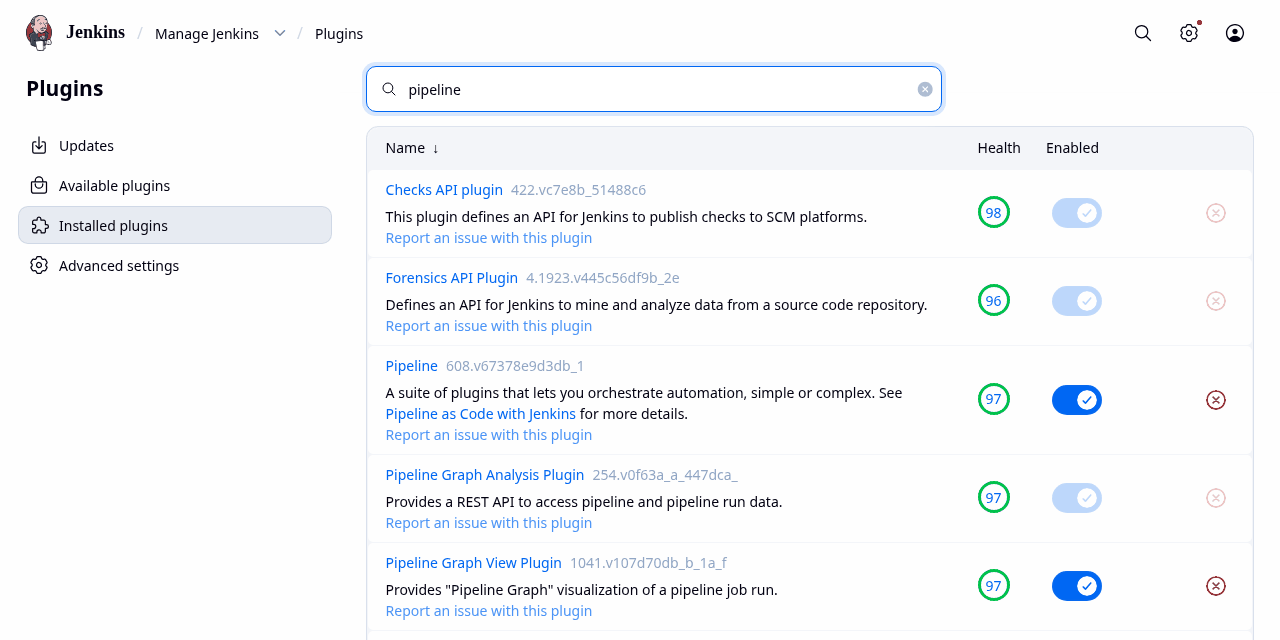
Manage Jenkins → Plugins → Installed, filtered to "pipeline" (local Jenkins 2.580.1). Docs: Managing plugins
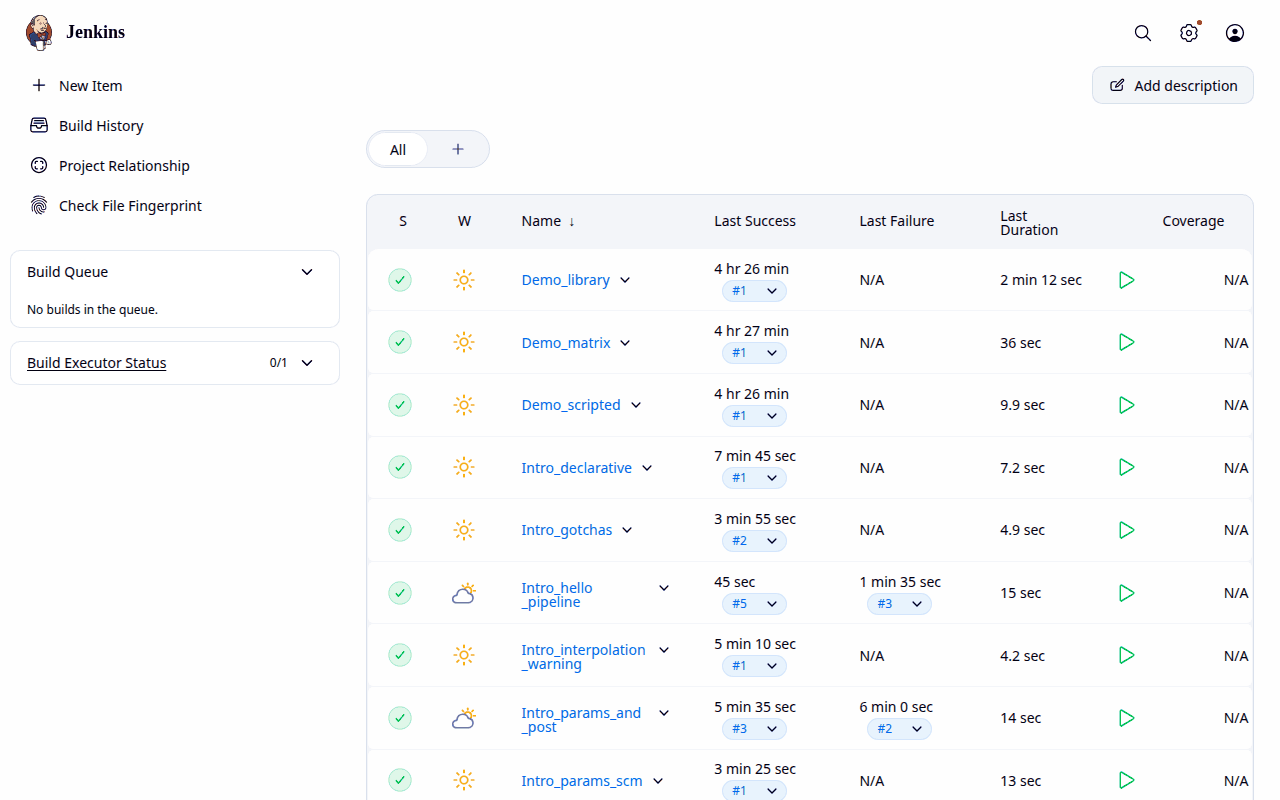
Dashboard: every job, its last result (S), a "weather" icon for recent stability (W), last success/failure and duration. The deck's demo jobs are the Intro_* rows.
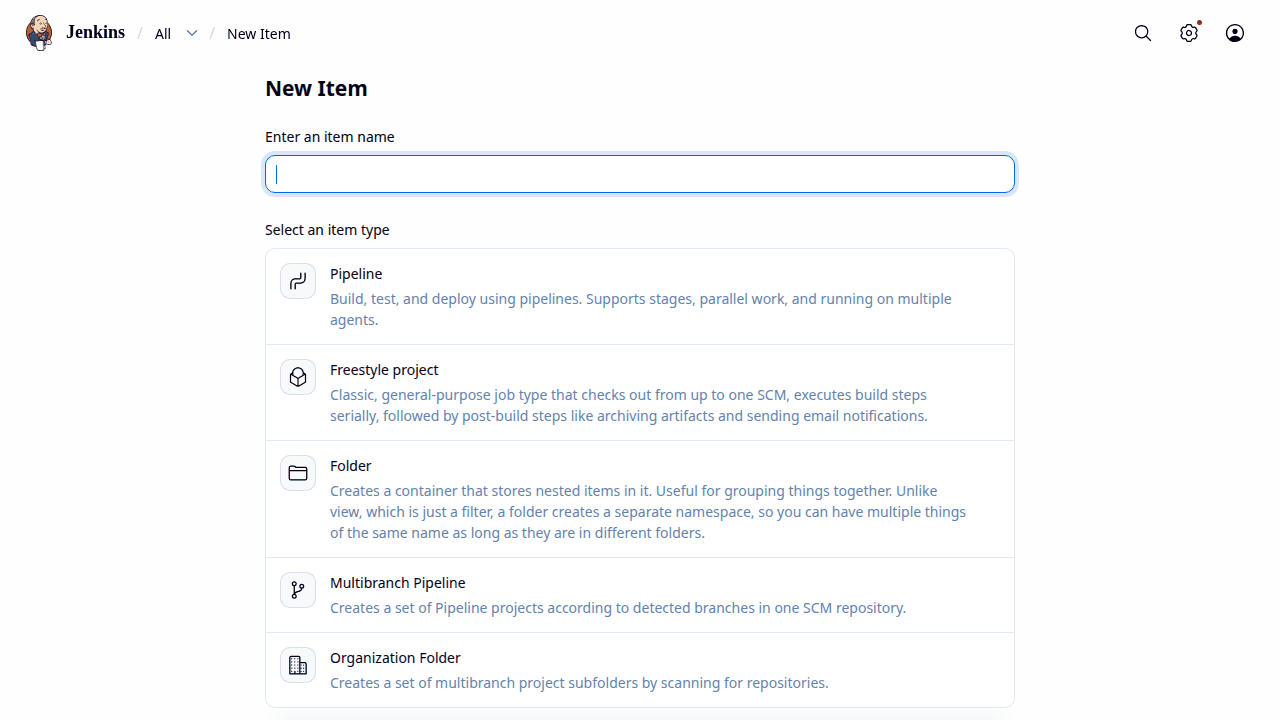
New Item: pick a job type. Pipeline for one Jenkinsfile; Multibranch Pipeline for one job per branch/PR; Freestyle is the classic form-driven job.
| Freestyle | Pipeline | |
|---|---|---|
| Defined in | web forms (stored as job XML) | a Jenkinsfile (Groovy DSL) |
| Reviewable | no diff, no PR | versioned with the code |
| Stages | one linear build | stages, parallel branches, multiple agents |
| Survives restart | build is lost | pipelines resume (durable) |
| Use for | a quick one-off | everything else |
Where the Jenkinsfile lives
- Pipeline script: pasted into the job (right). Handy for experiments
- Pipeline script from SCM: Jenkins checks out the repo and reads e.g.
Jenkinsfile. This deck's first pipeline is read fromdemo/Jenkinsfilein its own repo
Keep pipeline-as-code in the repo: the pipeline changes in the same PR as the code it builds.
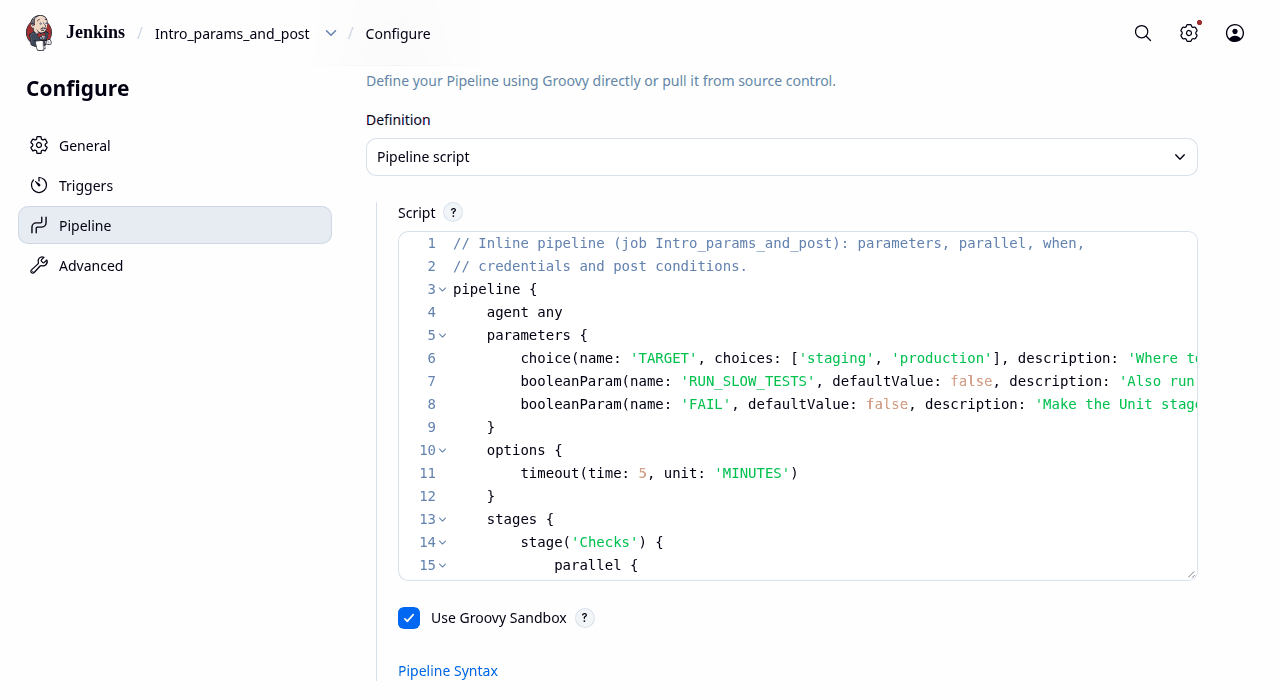
Configure → Pipeline for job Intro_params_and_post: an inline script, run in the Groovy sandbox.
Declarative ran: Intro_declarative #1
pipeline {
    agent any
    stages {
        stage('Build') {
            steps { sh 'echo building' }
        }
        stage('Test') {
            steps {
                script {
                    for (n in ['unit', 'smoke']) {
                        sh "echo running ${n} tests"
                    }
                }
            }
        }
    }
    post {
        always { echo 'cleanup' }
    }
}
Scripted ran: Intro_scripted #1
node {
    try {
        stage('Build') {
            sh 'echo building'
        }
        stage('Test') {
            for (n in ['unit', 'smoke']) {
                sh "echo running ${n} tests"
            }
        }
    } finally {
        echo 'cleanup'
    }
}Declarative: a fixed structure (pipeline → stages → steps), validated before it runs, with post, when, options built in. Escape into Groovy with script { }. Start here.
Scripted: plain Groovy around node and stage. Loops, maps and try/finally anywhere; you write your own cleanup and error handling. Use when declarative genuinely can't express it.
pipeline {
    agent any
    options {
        timeout(time: 10, unit: 'MINUTES')
        timestamps()
        buildDiscarder(logRotator(numToKeepStr: '20'))
    }
    environment {
        APP_NAME = 'calc'
    }
    stages {
        stage('Setup') {
            steps {
                dir('demo') {
                    sh '[ -x .venv/bin/pytest ] || { python3 -m venv .venv && .venv/bin/pip install -q pytest; }'
                }
            }
        }
        stage('Test') {
            steps {
                dir('demo') {
                    // delete last build's report first: a reused workspace keeps it
                    sh 'rm -rf reports && .venv/bin/pytest --junitxml=reports/junit.xml'
                }
            }
        }
        stage('Package') {
            steps {
                dir('demo') {
                    sh 'rm -rf dist && mkdir dist && tar czf dist/${APP_NAME}-${BUILD_NUMBER}.tar.gz calc.py'
                }
            }
        }
    }
    post {
        always  { junit 'demo/reports/*.xml' }
        success { archiveArtifacts artifacts: 'demo/dist/*.tar.gz', fingerprint: true }
        failure { echo "Build ${env.BUILD_NUMBER} failed: see the console" }
    }
}
What it does
- Job
Intro_hello_pipeline, "Pipeline script from SCM", script pathdemo/Jenkinsfile - Setup: a virtualenv with pytest (created once; the workspace keeps it)
- Test: pytest writes JUnit XML; old reports deleted first
- Package: a tarball named with
BUILD_NUMBER - post: record tests always; archive and fingerprint on success
Five real builds
- #1, #2: 3 tests pass
- #3: a commit adds
test_mean_of_empty_list;mean([])divides by zero → FAILURE, 1 of 4 failed - #4, #5: the fix is committed → 4 pass
The module, tests and Jenkinsfile are in demo/.
pipeline {
    agent any
    parameters {
        choice(name: 'TARGET', choices: ['staging', 'production'], description: 'Where to deploy')
        booleanParam(name: 'RUN_SLOW_TESTS', defaultValue: false, description: 'Also run the slow suite')
        booleanParam(name: 'FAIL', defaultValue: false, description: 'Make the Unit stage fail')
    }
    options {
        timeout(time: 5, unit: 'MINUTES')
    }
    stages {
        stage('Checks') {
            parallel {
                stage('Lint') {
                    steps { sh 'echo lint ok' }
                }
                stage('Unit') {
                    steps { sh "echo unit; test ${params.FAIL} = false" }
                }
                stage('Slow') {
                    when { expression { params.RUN_SLOW_TESTS } }
                    steps { sh 'sleep 3; echo slow ok' }
                }
            }
        }
        stage('Upload') {
            steps {
                withCredentials([string(credentialsId: 'results-upload-token', variable: 'TOKEN')]) {
                    // single quotes: the shell expands $TOKEN, Groovy never sees it
                    sh 'echo "token is ${#TOKEN} chars: $TOKEN"'
                }
            }
        }
        stage('Deploy') {
            when { expression { params.TARGET == 'production' } }
            steps { echo "Deploying to ${params.TARGET}" }
        }
    }
    post {
        always  { echo "post/always: ${currentBuild.currentResult}" }
        success { echo 'post/success: notify the channel' }
        failure { echo 'post/failure: email the committer' }
    }
}
The directives
agent: where to run (any,{ label 'x' }, per stage too)parameters: a form on "Build with Parameters"; read asparams.Xoptions:timeout,timestamps,buildDiscarder,retry…environment: env vars for every step (see Common Gotchas)parallel: sibling stages run concurrently (given executors)when: skip a stage unless a condition holdspost:always,success,failure,unstable,changed,fixed,cleanup…
Three real runs of it
- #1 defaults: Slow and Deploy skipped due to when conditional
- #2
FAIL=true: Unit fails; Upload and Deploy skipped;post/failureran - #3
RUN_SLOW_TESTS=true TARGET=production: all stages run
Reference: Pipeline syntax
Time and polling ran once; schedules not waited for
pipeline {
    agent any
    triggers {
        cron('H 2 * * 1-5')          // nightly, Mon-Fri; H spreads the start minute
        pollSCM('H/15 * * * *')      // poll the repo every 15 min (webhooks are better)
    }
    stages {
        stage('Nightly') {
            steps { echo 'nightly build' }
        }
    }
}
Branch conditions and more post linter only
pipeline {
    agent { label 'linux' }
    stages {
        stage('Release') {
            when { branch 'main' }
            steps { echo 'only on main' }
        }
    }
    post {
        fixed   { echo 'back to green' }
        cleanup { deleteDir() }
    }
}
Three ways a build starts
- cron: nightly or weekly runs.
Hhashes the job name into the field, so 100 nightly jobs don't all start at 02:00 - pollSCM: Jenkins asks the repo "anything new?" on a schedule. Simple, but wasteful and slow to react
- Webhooks: GitHub/GitLab calls Jenkins on push. Fast; needs the controller reachable from the forge and the matching plugin (e.g. GitHub). Not set up on this localhost-only Jenkins
- Triggers in a Jenkinsfile are saved to the job when it runs: a probe job with this file had no triggers until build #1, then both schedules appeared
when { branch 'main' }only means something in a multibranch job (see Multibranch Pipelines)- A remote trigger is an HTTP POST:
/job/NAME/build, or/job/NAME/buildWithParametersonce the job has parameters
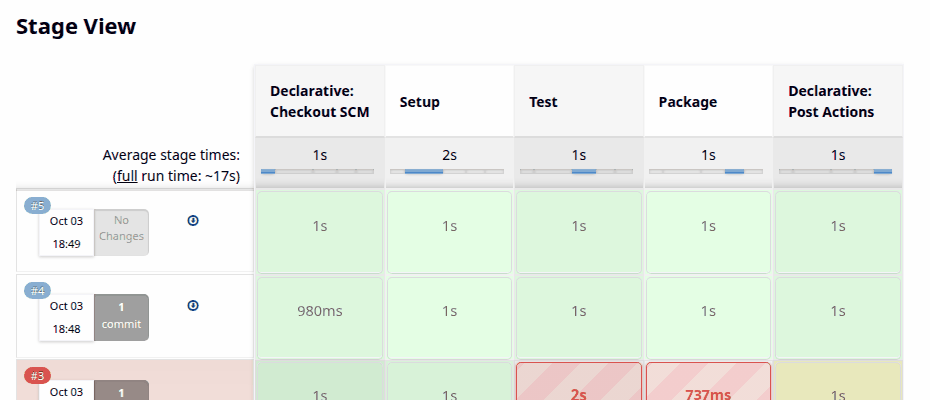
Stage View (Pipeline: Stage View plugin) on the job page: one row per build, one column per stage, with timings. #3 is red from Test onwards.
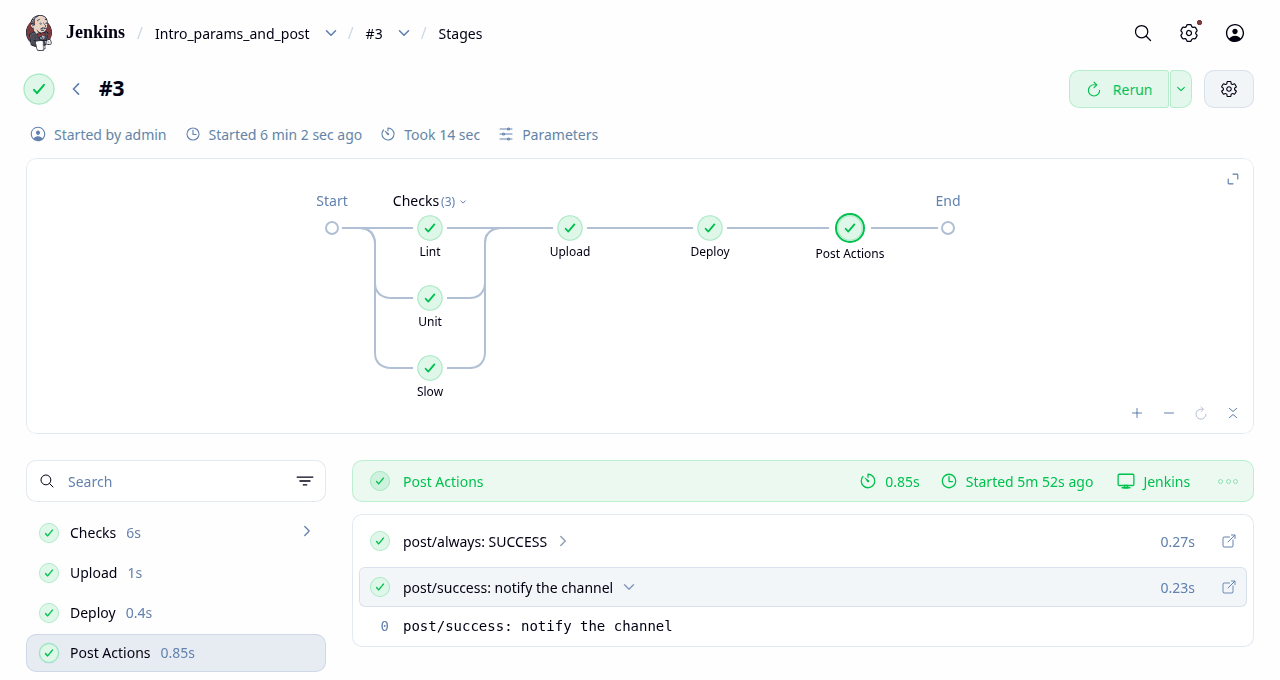
Pipeline Graph View (/job/NAME/N/stages) of Intro_params_and_post #3: the parallel Checks fan out, with each step's log beneath.
The console (/job/NAME/N/console) is still the ground truth: every step, its shell trace, and the [Lint] / [Unit] prefixes that tell interleaved parallel output apart. Replay re-runs a build with an edited script; Restart from Stage re-runs from a chosen stage.
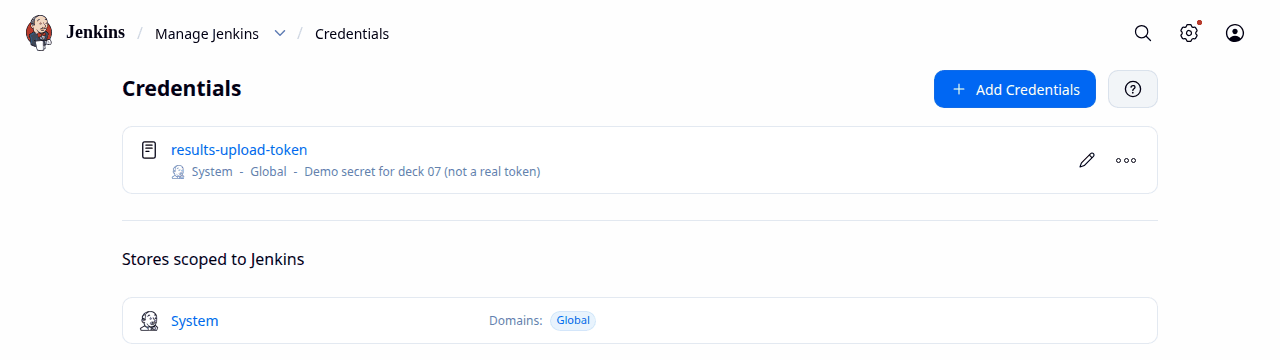
Manage Jenkins → Credentials: IDs and descriptions only; values are never shown again after saving.
- Types: secret text, username + password, SSH key, secret file, certificate
- Scoped to the system, a folder, or a domain; pipelines refer to the ID
withCredentials([...]) { }binds a secret to an env var for that block only, and masks it in the log
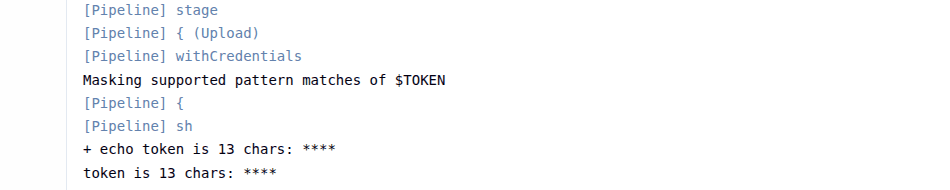
Correct (single quotes, the Upload stage in Declarative Anatomy): the shell expands $TOKEN; the log prints ****.
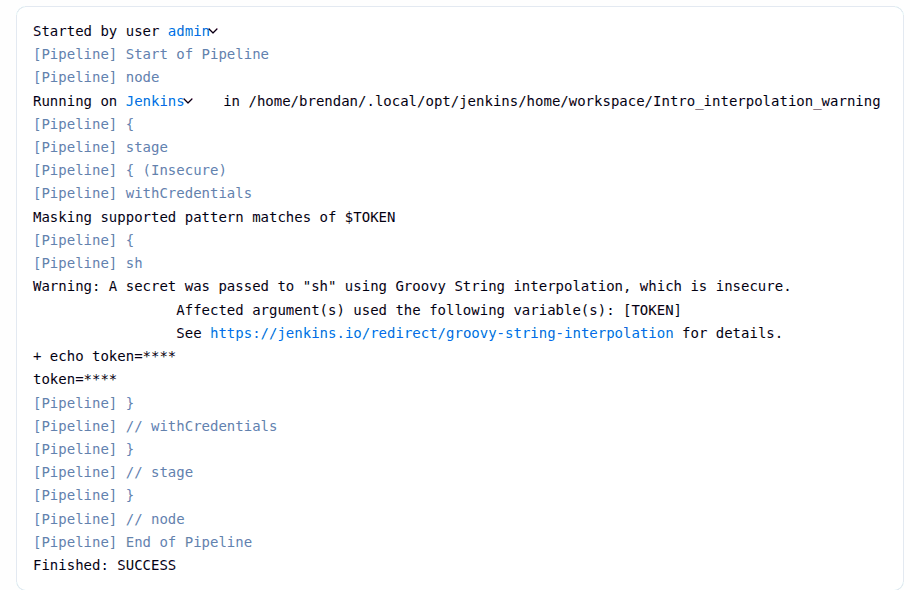
Insecure: sh "echo token=${TOKEN}" (double quotes) expands the secret in Groovy before the command reaches the agent: it is copied into the process arguments (visible with ps), and any shell metacharacters in it run. Jenkins warns; the fix is single quotes. See String interpolation.
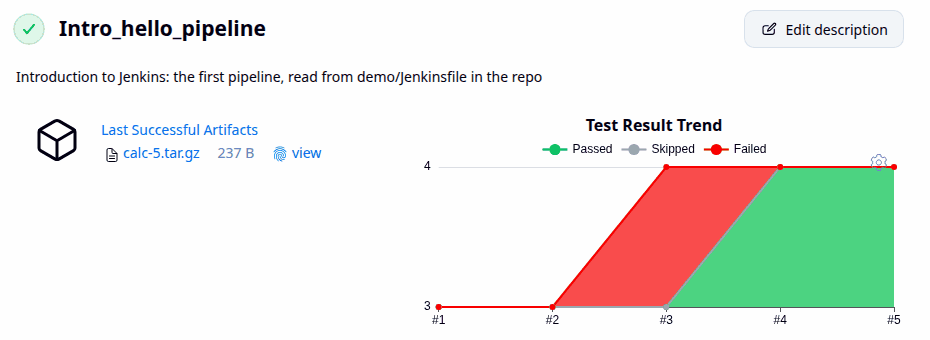
The job page after five builds: the archived tarball (with its fingerprint) and the Test Result Trend: 3 tests, then 4 with one failure at #3, then 4 passing.
archiveArtifactscopies files from the workspace into the build record on the controller (keep them small; use an artifact repository for big ones)fingerprint: truerecords an MD5 so you can trace which builds produced or used that exact file
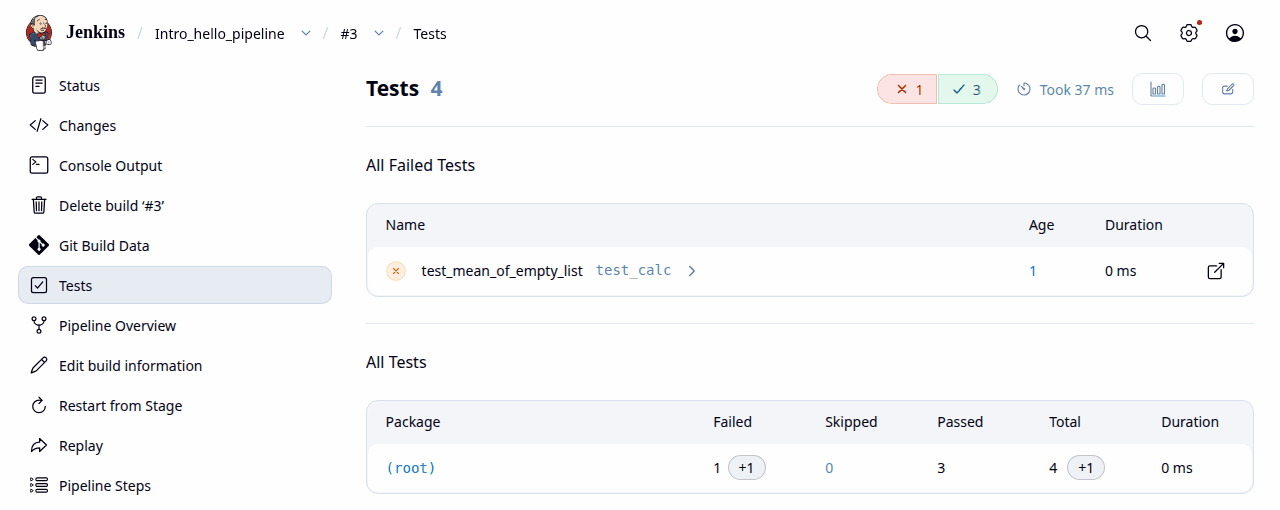
Build #3's test report: test_mean_of_empty_list failed (age 1: it failed for the first time in this build).
junit 'reports/*.xml'reads JUnit XML (pytest, JUnit, cargo-nextest, ctest… all emit it)- Put it in
post { always { } }so failures are still recorded - Failing tests alone make a build UNSTABLE (yellow); here pytest's non-zero exit also failed the stage, so #3 is FAILURE
When ten repos copy the same 80 lines of Jenkinsfile, move them into a shared library: a Git repo of Groovy that pipelines load by name.
my-library/
├── vars/          # global steps: vars/greet.groovy → greet()
│   └── greet.groovy
├── src/           # Groovy classes (org/acme/Build.groovy)
└── resources/     # files read with libraryResource
vars/greet.groovy
// A custom step: any pipeline that loads the library can call  greet 'name'
def call(String name = 'world') {
    echo "Hello, ${name}, from the shared library"
}
Using it ran: Intro_shared_library #1
@Library('intro-lib') _

pipeline {
    agent any
    stages {
        stage('Greet') {
            steps { greet 'Jenkins' }
        }
    }
}
Loading library intro-lib@main:demo/shared-lib/
Hello, Jenkins, from the shared library- Registered once under Manage Jenkins → System → Global Trusted Pipeline Libraries (name, default version, SCM)
@Library('name@v1.2') _pins a version; the trailing_is the annotation's target- Global libraries run outside the sandbox: review them like production code
- Here the library is a sub-directory of this repo (
demo/shared-lib, via the "library path" setting)
Docs: Extending with shared libraries. A bigger example drives SimEng 07's regressions.
Multibranch Pipeline
- Point it at one repo; it scans for branches (and PRs) containing a Jenkinsfile
- Creates one child job per branch/PR, and removes it when the branch goes
- Inside,
env.BRANCH_NAME,env.CHANGE_ID(PR number) are set, andwhen { branch 'main' }/when { changeRequest() }work
Organisation Folder
- Point it at a GitHub organisation or Bitbucket project; it creates a multibranch job for every repo with a Jenkinsfile
- New repos are picked up by the next scan or webhook
Pull-request builds
- The forge's branch source plugin (GitHub Branch Source, GitLab Branch Source…) discovers PRs and reports status back as a check
- Decide whether to build PRs from forks: their Jenkinsfile is untrusted code
- Typical flow: PR → lint + unit + report; merge to main → full suite + deploy stage
Not run here. Both are configured in the UI against a hosted forge (credentials, webhooks), which this localhost-only Jenkins doesn't have. See Branches and pull requests.
Blue Ocean was a redesigned UI for pipelines (visual graph, PR-centric views, a pipeline editor). Many tutorials still show it.
Current status (checked October 2026)
jenkins.io: "Blue Ocean has been deprecated since July 2026. It will not receive further security fixes or functionality updates." Don't install it on a new controller.
Source: jenkins.io/doc/book/blueocean. Plugin status changes; check the page before deciding.
The suggested successors
- Pipeline Graph View: "actively maintained and provides the most crucial features of Blue Ocean". Its graph is the right-hand screenshot on Seeing a Run
- Pipeline: Stage View: the stage table on Seeing a Run
- For writing pipelines, the built-in Pipeline Syntax snippet generator (the link under every pipeline editor)
A Jenkins controller holds credentials for your repos, registries and clouds, and runs code from every branch. Treat it as production infrastructure.
Isolate builds
- No builds on the controller: set the built-in node's executors to 0; a build there can read
JENKINS_HOME, secrets included (controller isolation) - Agent → controller access control is on by default; leave it on
- Ephemeral agents (a fresh container per build) stop builds poisoning each other
Contain Groovy
- Pipelines run in the script security sandbox; calls outside the allow-list fail until an admin approves them (In-process script approval)
- Approve narrowly; the script console (
/script) is full admin power
Control access
- Never "anyone can do anything". Use Matrix Authorization or Role-based Authorization; single sign-on through a security realm plugin
- Keep CSRF protection (the "crumb") enabled; scripted clients authenticate with API tokens
Keep it current, keep secrets out
- Update core and plugins regularly; read the security advisories; uninstall plugins you don't use
- Secrets live in the credentials store, bound with
withCredentials, never in a Jenkinsfile, a parameter or anecho - Prefer short-lived tokens; back up
JENKINS_HOME/secretssecurely
| Aspect | Jenkins | GitHub Actions | GitLab CI/CD |
|---|---|---|---|
| Hosting | you run the controller and agents | hosted runners, or self-hosted runners | GitLab.com runners, self-managed GitLab, or your own runners |
| Config | Jenkinsfile: Groovy DSL | .github/workflows/*.yml | .gitlab-ci.yml |
| Forge | any Git (or SVN…) host | GitHub only | GitLab (can mirror external repos) |
| Extensibility | 2,100+ plugins; powerful, and each is code you must keep updated | Marketplace actions (pin them by SHA) | built-in features, CI/CD components, templates |
| Maintenance | high: upgrades, plugin compatibility, backups, agents | low on hosted runners | low on GitLab.com; moderate self-managed |
| Cost | free software; you pay for machines and people's time | free for public repos on standard runners; private repos get plan minutes, then pay per minute | plan-based compute minutes for GitLab-hosted runners (Free tier: 400/month); or register your own runners |
| Control | total: air-gapped networks, licensed tools, special hardware | limited on hosted; full on self-hosted runners | full when self-managed |
Pricing and quotas change: check GitHub Actions billing and GitLab compute minutes before deciding. Plugin count: 2,116 in the update centre on 3 October 2026 (plugins.jenkins.io).
New to GitHub Actions? Introduction to GitHub Actions is the hands-on guide: workflows, security, debugging and protecting main, every example run for real.
Choose Jenkins when…
- builds must run on-premises or air-gapped
- they need special hardware or licensed tools: FPGA boards, EDA simulators, GPUs, test rigs
- code lives on several forges, or none
- you need complex orchestration (matrix regressions, gated nightlies, cross-repo flows)
- you have people to run it
Choose GitHub Actions when…
- the code is on GitHub
- standard Linux/macOS/Windows runners are enough
- you want zero servers to maintain
- PR checks and the Marketplace cover the workflow
Choose GitLab CI when…
- the team already uses GitLab
- you want source, CI, registry, environments and security scanning in one product
- you want self-hosting without plugin management
Mixing them is common: GitHub Actions for fast PR checks, Jenkins for the hardware-in-the-loop or licence-bound regressions that can't run on hosted runners. The hardware and simulation case is the subject of SimEng 07: Jenkins for Simulation Teams.
From the WAR file how this deck's Jenkins runs
# needs a supported Java (this deck: JDK 21)
java -jar jenkins.war --httpListenAddress=127.0.0.1 --httpPort=8080
# first start prints an initial admin password, also in
#   $JENKINS_HOME/secrets/initialAdminPassword
With Docker not run here: no Docker on this PC
docker run -p 8080:8080 -p 50000:50000 \
  -v jenkins_home:/var/jenkins_home jenkins/jenkins:lts-jdk21
Port 50000 is for inbound agents. Docs: WAR file, Docker, Java support policy. Image tags change; check Docker Hub.
The setup wizard
- Unlock with the initial admin password
- Install suggested plugins (or pick your own)
- Create the first admin user; set the Jenkins URL
This deck's Jenkins skips the wizard (-Djenkins.install.runSetupWizard=false) and sets itself up from a Groovy script in init.groovy.d/: an admin user, an API token, the jobs.
A first pipeline in five minutes
- New Item → Pipeline → name it
- Pipeline → Definition: "Pipeline script"; paste the declarative example from Declarative vs Scripted
- Save → Build Now
- Open the build → Console Output, then Stages
- Move the script into your repo as
Jenkinsfileand switch to "Pipeline script from SCM"
Trap: env in a parameter default ran: Intro_gotchas #1–2
parameters {
    string(name: 'TOOL_ROOT', defaultValue: "${env.HOME}/tools", description: 'Default built from env.HOME')
    string(name: 'MODE', defaultValue: 'quick', description: 'A plain default')
}
environment {
    TOOL_FROM_PARAM = "${params.TOOL_ROOT}"
    PATH = "${params.TOOL_ROOT}/bin:${env.PATH}"
}
shell: TOOL_FROM_PARAM = null/tools
shell: PATH starts null/tools/binparameters is evaluated before the agent exists, so env.HOME is null there and the default becomes the text null/tools. The bad value then flows through environment into sh. (In a step, env.HOME was fine.)
Fix: build paths in the step's own shell ran: Intro_gotchas_fixed #1
sh '''
    TOOL_ROOT="${TOOL_ROOT:-$HOME/tools}"
    export PATH="$TOOL_ROOT/bin:$PATH"
    echo "shell: PATH starts ${PATH%%:*}"
'''
shell: PATH starts /home/brendan/tools/bin- Stale reports in a reused workspace. A build that dies before writing new JUnit XML can publish the previous build's results. Delete reports first (the first pipeline does)
- Stale pip git dependencies. A reused virtualenv keeps an old
pkg @ git+…whose version didn't change, so you test old code. Force-reinstall what's under test - Parameterised jobs need
buildWithParameters. A plainPOST …/buildto one returned HTTP 400 here and queued nothing - "Params are null on a first build." Not reproduced on 2.580.1: build #1 got its defaults (declarative inline and from SCM, scripted
properties()). A?:fallback is harmless
The stale-report and stale-dependency traps hit real builds in SimEng 07, which documents them.
What we covered
- Jenkins: a self-hosted automation server; Hudson (2004) → Jenkins (2011) → CD Foundation (2019)
- A controller schedules work onto agents' executors, chosen by label
- Plugins provide nearly everything, and need upkeep
- Write Pipelines, not Freestyle; declarative first; Jenkinsfile in the repo
- Credentials by ID with
withCredentials, single-quotedsh - Record tests in
post { always }; archive and fingerprint artifacts - Shared libraries for reuse; multibranch for branches and PRs
- Blue Ocean is deprecated: use Pipeline Graph View
- No builds on the controller; keep it patched
Next
- SimEng 07: Jenkins for Simulation Teams: matrix regressions, shared libraries, performance gates, real runs of five hardware/simulation repos
- Introduction to CI/CD: the practice that Jenkins automates
- Interview_CI_CD: questions to test yourself
Further reading
The Jenkins User Handbook · Pipeline syntax · Pipeline steps reference · Securing Jenkins · Pipeline best practices